Project 4: final project
P4 pulls it all together. You will combine your skills in design thinking, interaction design, and visual communication to solve a meaningful user need. You will iterate with the studio staff to refine your project's needs, ideas, studies, and prototypes. The project will culminate with an implemented prototype shown off to your adoring fans at the final project fair.
Goal
In P1, you practiced how to capture ideas and share them with others. In P2, you demonstrated your visual and interaction design skills. In P3, you worked to deepen your needfinding insight and to prototype rapidly. Now, with P4, you will synthesize these skills toward an idea that you'll be prototyping in code.
This should be the most ambitious design project you've undertaken thus far. We aim to prove to you how much you've learned.
Brief
P4 will be completed in groups of three from your studio. We encourage you to mix up your teams a bit from P3.
Project 4 is a multi-week, iterative design process to produce an implemented prototype in reaction to user needs on your studio's theme. The first two weeks mirror P3 to give us a chance to iterate, flare and explore. The final three weeks are focused on successively narrowing toward an implemented design.
Based on your feedback, we are adjusting our feedback schedule starting with P4. Our goal is to give you time to integrate feedback and iterate while balancing the constraints of studio instructors' professional schedules.
We will be returning all feedback within 48 hours. Assignment deadlines will now vary by studio. Studio deadlines are:
- Mapping and Navigation: Sundays 11:59pm
- Data Narratives: Sundays 11:59pm
- Leveling the Playing Field: Saturdays 11:59pm
- Deepening Social Ties: Sunday 11:59pm
- Health: Sundays 11:59pm
- Serendipity: Saturdays 11:59pm
Part 0
due wednesday february 11 @ 5:00pm
Form a team of three within your studio and stake out a rough needfinding plan.
Form a team
Your user group may or may not be accessible over Presidents' Day weekend, so we want you to be able to get a rapid start. Form a team of three from your studio. We suggest that you seek out teammates who bring together complementary skills and who have compatible schedules and priorities. If your studio cannot divide evenly into groups of three, the final group(s) can be two people.
Write a brief needfinding plan
Was there an idea in P3, even one that you didn't pursue, that you'd love to explore deeper? Did your P3 experience orient you toward a user group or a need that you didn't originally see? Reflect on your experiences so far with the studio theme and with your prototype feedback from P3.
You are welcome to choose any direction that fits within your studio theme. You may extend ideas from P3, or pivot and start with a new user group or need. The expectation will be that this second round of needfinding will carry you deeper, so it may take some time to set up the interviews and the trip. We'd also like to be able to give you feedback and connect you with relevant user groups when we can.
Decide on a rough needfinding plan, focusing on with whom and where you want to do your needfinding. If you are extending an idea from P3, we recommend finding a needfinding angle that can deepen your understanding of the needs and the stakeholders.
You will not be held to this needfinding plan, but it is our chance to give you feedback as early as possible.
Submit
Fill out this Google Form to tell us your team members and your needfinding plan. We'll email a response by Thursday night with any pointers we have.
Part I
deadlines by studio: february 14 / 15 / 16
Your assignment for Part I is to iterate on a second round of needfinding based on your experiences with P3. This will be a check-in rather than a formal assignment.
Needfinding status update
Design is an iterated process of flare and focus. In P3, you went through an expansion period, flaring out to new ideas through your needfinding and brainstorming, then a narrowing period, focusing in on specific ideas. Here, we will begin P4 by taking your insights from P3 and using them to flare again, this time armed with the knowledge and clearer purpose that comes from your experiences with P3.
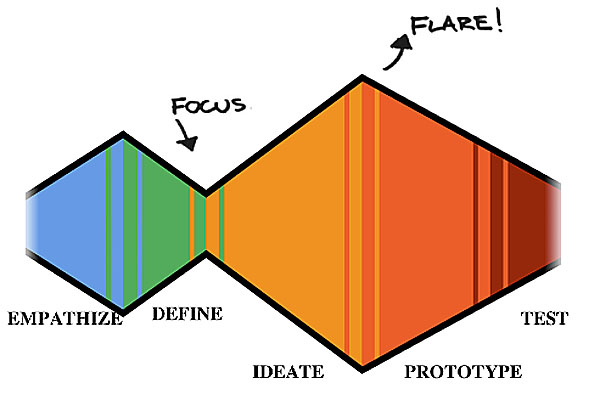
Based on your reflections in Part 0, go perform a second round of needfinding. Follow the same general form as in P3: prepare a discussion guide, capture raw observations, then grab a whiteboard and post-its and synthesize them into interpretations and needs. Unless you have completely pivoted, connect your results back to the needfinding and user feedback from P3.
The deliverable for Part 1 is a status report on your needfinding. We hope to see, at the very least: a clear list of stakeholders, your status in planning your visit(s), and a set of interview questions you will be asking. You do not need to stick to just those interview questions — we encourage you to let the discussion flow.
If you have already performed your observations by this deadline, feel free to include your raw observations as well. We may be able to help you reflect on them.
Submit
Pull everything together into your P4 submission folder. That includes:
- One PDF that contains your needfinding status update, including the list of stakeholders you will be working with, your status in planning and executing your observations and interviews, and your set of interview questions.
Grading rubric
| Category | Unsatisfactory | Adequate | Good | Excellent |
|---|---|---|---|---|
Progress 7pt |
1: Inadequate preparation and inappropriate needfinding population. | 3: Needfinding population seems to be a convenience sample rather than chosen for its ability to lend insight. Content preparation is thin. | 5: Needfinding population is a reasonable match, but could be better targeted. Content preparation is reasonable. | 7: Needfinding population is chosen well, and team is well prepared. |
If any of the deliverables are missing, we will reduce your score by 25% per deliverable.
Part II
deadlines by studio: february 21 / 22 / 23
In Part II, we again iterate on our designs based on the needfinding results and then create rapid prototypes.
Needfinding Analysis
Execute on your needfinding plan and gather your observations. Once your observations are complete, it's time to synthesize the results. Once again, grab a whiteboard, and start by putting all your observations onto Post-It notes. Start grouping them, turning the observations into interpretations, and then regrouping as necessary. Aim to produce needs. Those needs will lead to "How Might We..." questions.
As part of your synthesis, generate three people profiles to capture different stakeholders or user groups. (See a template here that you can copy and edit for your submission.) People profiles ensure that you have enough depth on a perspective from your conversations to tell a story. They help your results become more emotionally resonant.
The rest of your needfinding report should take the same format as in P3. In particular, make sure to back up each interpretation and need with: 1) an observation, a quote or a picture; and 2) a "How Might We...?" question that you can use while brainstorming.
Brainstorming
As before, start with your "How Might We..." questions to flare and brainstorm a new set of design ideas. When brainstorming, remember to go for volume. You'll want at least 15 ideas, and probably many more. When you're done, brainstorm dark horse candidates as well.
As in P3, capture your ideas to share them with us. Sketch out ideas clearly for the staff the read and understand. You can use a combination of media if it's helpful.
Focus
Once more, focus your brainstorm down to three ideas you would seriously consider pursuing and expand upon them. We encourage you to make one of them a dark horse candidate. Detail your design goals in writing. Then, sketch a storyboard to explain the idea. It should capture the users, their needs, and how your solution addresses those needs.
Prepare for studio
Be prepared to present your needfinding results and three ideas in a total of four minutes in studio. Slides may be an effective way to convey the main points.
Now that we've learned in class how to present design work, we will begin including points in the rubric for the quality of your in-studio presentation.
Submit
Pull everything together into your P4 submission folder. That includes:
- One PDF that contains your needfinding report, including your discussion guide, your observations, your interpretations and needs, your people profiles, and your "How Might We...?" questions.
- One PDF that contains your brainstormed idea sketches, and your further explorations of three top ideas.
Grading rubric
| Category | Unsatisfactory | Adequate | Good | Excellent |
|---|---|---|---|---|
Needfinding insight 7pt |
1: Observations and interpretations are off-target or inappropriate. | 3: Observations and interpretations largely report surface-level results or basic description. | 5: Observations and interpretations present some novel insights and synthesis, but may be uneven in quality. | 7: Observations and interpretations present a consistently novel and insightful synthesis of the domain. |
Design insight 7pt |
1: Ideas are not appropriate to the domain, do not articulate design goals, or do not address the given needs. | 3: The designs address user needs in ways that are surface-level interpretations of the problem space. Design goals are trivial or not well-connected to the idea. | 5: Ideas address user needs in generally appropriate ways, but are uneven in their depth. Some may be incremental, have questionable design goals, or are surface-level interpretations of the problem space. | 7: Ideas present nontrivial and insightful interpretations of the design space, grounded in well-articulated design goals. |
Design communication 7pt |
1: Needfinding report and idea sketches are incomplete or very difficult to interpret. | 3: Needfinding report and idea sketches tend to obscure the main idea. | 5: Needfinding report and idea sketches are interpretable, but not always clear or grounded in evidence. | 7: Needfinding report and idea sketches clearly communicate the intended ideas and designs. |
Design presentation 3pt |
1: Presentation in studio was incomplete or extremely difficult to understand. | 2: Presentation in studio did not focus well on the core message or its delivery was moderately unclear. | 3: Presentation in studio focused on the core message effectively and explained the content clearly. |
If any of the deliverables are missing, we will reduce your score by 25% per deliverable.
Part III
deadlines by studio: february 28 / march 1 / march 2
In Part III, we will iterate our idea toward a rough functional prototype. The final part of this week's assignment involves the first time you're writing code, so make sure that you give yourself enough time.
Revisions and brainstorms
First, reflect on the feedback you got in studio, and refresh your ideas. You are welcome to pivot, but make sure you are addressing the feedback you received.
Return to the brainstorming table. In light of the feedback, toss out new ideas. Take advantage of the distance you've gotten since your first brainstorm to go even wilder and deeper. Is anything sticking?
Based on your reflections and brainstorms, choose three designs you'll be moving forward with to prototype. Include one dark horse idea. Include a short writeup to detail the changes you made and explain your thinking behind those changes. The writeup should be at least a paragraph per design to fully explain the reflections and iteration you've done.
Three prototypes
Once again, we'll prototype in parallel. Consider what question is the most important one to ask of each design, and how your prototype can answer just that question. Construct a rapid prototype for each idea.
Capture your questions and prototypes so that we can understand what you did. Include relevant materials (e.g., images, videos) and a short description.
Rapid feedback
And now we engage with users once more. As in P3, bring your three prototypes to enough users to get sufficient feedback, likely around four different people. Aim for a reasonable facsimile of your user group. If you have easy access to representative users for your designs, work with them. Otherwise, get as close as you can using the social capital you have at hand. Given that you will also be working on a skeleton functional prototype after this, plan ahead so you have time to grab a few users. Ask your studio staff if you need help.
Remember to use all your skills to make users not feel like they are being evaluated, and to capture observations. Write up a summary of your findings. First, describe your method and who you tested with. Second, tell us what you saw.
Third, tell us your interpretation and reflections. What did this second round of feedback imply about your original design questions that led to the prototypes? Has this activity uncovered any deeper insight into the design space?
Skeleton functional prototype
Reflecting on your study results, it is time to select an idea you want to pursue further. Which idea do you think speaks most deeply to a need, rather than a usability patch? Which idea addresses that need with a nontrivial design insight? Which one are you most excited to pursue? You are welcome to refine one of your three ideas, or pivot and pursue a new design. If you pivot, we encourage you to let your studio staff know about your new idea as soon as possible.
We will now focus and begin creating a prototype in code. Recall our guide to creating a prototype: focus on the most important unanswered question about your design. What do you need to create in order to answer that question?
Your final goal for this week is to create a skeleton functional prototype. A skeleton prototype is one that comprises the central interaction of your design in code, and nothing more. Don't make it pretty. Don't try to build out the whole idea. Keep it lightweight. Feel free to Wizard of Oz components that you will later implement. Fake any data or user accounts. Show us the general interaction scaffold that you'll be fleshing out in later weeks.
Consider this a core-then-expand approach to engineering where you start with a rapid minimum viable prototype and then iterate. Contrast this to a modular execution approach where you know the final architecture at the beginning and build it week by week in modular components. The modular approach, while attractive in other classes, is not a good match for design work — there is no point in building robust infrastructure when you are likely to toss it out or evolve the design.
Remember, there's no way that you can complete an overly ambitious prototype alongside your other goals for this week, even with three of you. Focus on just the most critical element and prototype just that in code. If you've focused your question correctly, your prototype will convey the most important aspect of the experience that you are envisioning.
You are welcome to use any platform you'd like. The TAs can provide technical support for web and mobile web.
Team dynamics check-in
When you submit this assignment, everyone on the team should take a moment to privately evaluate how the team is doing. Is everyone pulling their weight? Are the collaborations effective? Are communication channels open?
Everyone must fill out our Team Dynamics Check-in along with their deliverable this week. If things could be going better, this gives us as staff a chance to step in and help.
Prepare for studio
Be prepared to present your three prototypes, your user feedback, and a snapshot of your skeleton prototype in a total of four minutes in studio.
Submit
Make a separate subfolder in your P4 submission folder for the Part III deliverable. Put in there:
- A PDF with your reflections, brainstorm and changes following your Part II crit.
- A folder for each prototype: the question each was trying to ask, and a description (including images) of each prototype.
- A PDF with your user feedback.
- One PDF with screenshots of your current prototype. Add descriptive text so that we can tell what's going on. If you'd prefer a screencast movie with voiceover, that works great as well.
- Everyone in the team must individually fill out the Team Dynamics Check-in
Grading rubric
| Category | Unsatisfactory | Adequate | Good | Excellent |
|---|---|---|---|---|
Parallel prototypes 7pt |
1: Prototypes are incomplete or at a wholly inappropriate level of fidelity (too low or too high). | 3: Prototypes have significant issues with level of fidelity, or target the wrong aspect of the experience. | 5: Prototypes have minor issues with being at too high or too low a level of fidelity, or are slightly off-target in the aspect of the experience they are prototyping. | 7: Prototypes are instantiated at the right level of fidelity and target exactly the experience and question implicit in the design idea. |
Feedback 7pt |
1: User feedback is incomplete or does not provide insight into the design space. | 3: User feedback was attempted but was executed or reported in such a way that it provides little insight into the designs. Reflections are weak. | 5: User feedback was executed with minor issues or provides surface-level feedback on the designs. Reflections are generally pushing the ideas ahead, but some may reflect more usability patches. | 7: User feedback was executed appropriately and provides useful reflection and insight into the designs. |
Skeleton prototype fidelity 7pt |
1: Skeleton prototype is non-functional. | 3: Skeleton prototype is missing key functionality to answer its design question, or aimed too broadly and did not have time to implement the core interaction. | 5: Skeleton prototype is generally well-executed, but is missing some relatively important elements or slightly diffuse in its goals. | 7: Prototype succesfully executes on its goals. |
Design presentation 3pt |
1: Presentation in studio was incomplete or extremely difficult to understand. | 2: Presentation in studio did not focus well on the core message or its delivery was moderately unclear. | 3: Presentation in studio focused on the core message effectively and explained the content clearly. |
If any of the deliverables are missing, we will reduce your score by 25% per deliverable.
Part IV
deadlines by studio: march 7/8/9
In Part IV, we will flesh out our functional prototype.
Reflect
Once more, reflect on the critique from your studio staff. Are there ideas that you can integrate or use to adjust your approach? Write up a short paragraph synthesizing how your design or prototype is changing based on the critique.
Iterate
Flesh out your prototype. Again, it's a prototype and not a demo: it doesn't need to be complete. If you ever start talking about options or preferences or user logins, stop — you're not focusing on the right parts of the prototype. You can probably even fake most of the data in your application. We don't expect a live database. However, the prototype should be sufficiently mature now so that you can get user feedback on the main interaction flow and needs.
Final presentation draft
The final presentation fair is next week, and you'll have 45 seconds there to get everyone else excited about your idea. Brainstorm your presentation using the techniques from class and put together a draft. Submit the slide with your materials for this week. You'll be performing your draft presentation in studio.
User study plan
Next week, you'll be doing a user study on your functional prototype. This will be our final user feedback session in this class, so make an effort to find representative users. Especially if you have hard-to-reach users, it's important to set those wheels in motion now. Put together a user study plan. This should include:
- Where you will find your users. You'll need at least five users. If they are hard to reach, provide evidence that you have scheduled a time with them.
- The tasks or goals your users will be completing with your system.
- The questions about your design that you seek to answer through the study.
Prepare for studio
The first forty five seconds of your presentation in studio will be your draft final presentation. In the other three minutes (and fifteen seconds, natch), you will share more detailed progress on your implementation and your user study plan.
Submit
Pull everything together into your P4 submission folder. That includes:
- One PDF that contains your reflections.
- One Powerpoint file or PDF with your final presentation draft.
- One PDF with your user study plan.
- One PDF or short movie of your current prototype. Add descriptive text or voiceover so that we can tell what's going on. If your prototype is implemented for the web, we would strongly encourage you to include a link.
Grading rubric
| Category | Unsatisfactory | Adequate | Good | Excellent |
|---|---|---|---|---|
Prototype focus 7pt |
1: Prototype was much too broadly or too narrowly scoped, or its implicit question was ill stated. | 3: Prototype did not focus on the right question, or did not succesfully answer that question. | 5: Prototype's focus is slightly diffuse, or its implicit question is not entirely appropriate. | 7: Prototype focuses effectively on an appropriate design question. |
Prototype fidelity 7pt |
1: Prototype is non-functional. | 3: Prototype is missing key functionality to answer its design question. | 5: Prototype is generally well-executed, but is missing some relatively important elements. | 7: Prototype succesfully executes on its goals. |
Study plan 3pt |
1: Study plan is incomplete or will not result in useful insights. | 2: Study plan is adequate but has nontrivial issues that can be addressed. | 3: Study plan is well-matched to the design goals. | |
Design presentation 3pt |
1: Presentation in studio was incomplete or extremely difficult to understand. | 2: Presentation in studio did not focus well on the core message or its delivery was moderately unclear. | 3: Presentation in studio focused on the core message effectively and explained the content clearly. |
If any of the deliverables are missing, we will reduce your score by 25% per deliverable.
Final presentation
due friday march 13 @ 5pm
This is it! Let's show everyone what you've been working on!
User feedback
Follow up with the users that you scheduled last week. Keep working with users until you start noting the same observations over and over. This should involve at least five different users. (If the nature of your design means that your user group is extremely difficult to connect with, coordinate with your studio staff to decide on a realistic goal.)
For each user, set the stage and make sure they understand that you are testing the prototype, not them. Lay out tasks or goals that they are trying to achieve, and let them interact with your prototype. Make sure one of your team members is taking notes and recording any relevant media (e.g., photos, video). Another team member should guide the process. Encourage the user to follow a think-aloud protocol — you likely learned this technique in CS 147. Try your absolute hardest not to intervene. Watching helplessly as someone struggles to use your interface is one of the hardest, but most valuable, things you can do.
Afterwards, as with P3, it's time to synthesize. Convert your observations into sticky notes and start clustering them on a whiteboard. Identify themes, re-cluster, and discuss until your main reflections have settled.
Write up a report detailing your method, results, and reflections. Make sure to include: how will these reflections influence your final design efforts?
Iterate
Based on your feedback from your users and in your studio, iterate on your prototype so that it's ready for the final presentations. This is your last chance to pull out the stops!
Presentation
There will be three components to your final presentation.
Pitch
Poster
Prototype
You need to come up with a forty five-second pitch to the audience. You are welcome to design your pitch however any way that you feel will be compelling. We will present your slide(s) behind you as you present, and will automatically go on to the next group after forty five seconds. Keep in mind that your audience are likely design experts.
You will need a 20"x30" poster to tell judges about your project. This is a chance to show off your visual design skills. A common error is to put too much content on the poster. Keep it simple and convey the main concept. It should be geared towards pitching your project to viewers/judges and not about your design process. We will provide easels; you will need to print out and mount your poster on a stiff backing so that it can stand alone on the easel. Posters can be printed at Costco($25) or Walgreens ($24). They usually have a 1-2 day turnaround. You can order online and pick it up from the store. You can also print at Lathrop ($50) and pick it up on campus.
Bring it so you can show it off during the demo and poster session! The staff and judges will interact with it there. Prepare a user task or scenario (or maybe a small set of them) to run through on the prototype with visitors to your poster. Think in advance of how to demo your system with as little friction as possible. For example, can you have prepared login accounts rather than needing everyone to make their own?
Class and team reflection
It's important that we as the staff have a sense of how your team dynamics played out. All members of the team need to separately fill out this Google Form by Monday 3/16 to share reflections on CS 247 and their team's work balance.
Submit
Pull everything together into your P4 submission folder. That includes:
Presentation Deliverables (due Friday by 10am):
- A slide with your project name
- Either:
- A 45-sec video about your project, or
- A powerpoint(16:9 aspect ratio, pptx) presentation for your project. If your presentation is on multiple slides or uses animation, time the slides to advance automatically.
Everything Else (due Friday by 5pm):
- A PDF with your final poster.
- If you can share it with us, a link to your final prototype. If you can't share it, we'd appreciate a short movie showing it off.
- One PDF with your user study report.
- Don't forget to fill out the class and team reflection form by Monday 3/16.
Grading rubric
All scores are doubled here to reinforce the importance of the final projects.
| Category | Unsatisfactory | Adequate | Good | Excellent |
|---|---|---|---|---|
Design insight 14pt |
2: Ideas are not appropriate to the domain, do not articulate design goals, or do not address the given needs. | 6: The designs address user needs in ways that are surface-level interpretations of the problem space. Design goals are trivial or not well-connected to the idea. | 10: Ideas address user needs in generally appropriate ways, but are uneven in their depth. Some may be incremental, have questionable design goals, or are surface-level interpretations of the problem space. | 14: Ideas present nontrivial and insightful interpretations of the design space, grounded in well-articulated design goals. |
Presentation 14pt |
2: Presentation, poster and demo are incomplete or insufficient. | 6: Presentation, poster and demo tend to obscure the main idea. | 10: Presentation, poster and demo are generally clear, but uninspired or slightly muddy in their execution. | 14: Presentation, poster and demo communicate the design idea clearly and effectively. |
Prototype + interaction design 14pt |
2: Prototype is non-functional or has little attention to interaction design . | 6: Prototype is missing key functionality or has significant interaction flaws. | 10: Prototype is generally well-executed, but is missing some relatively important elements or has minor to moderate interaction errors. | 14: Prototype succesfully executes on its goals and has strong interaction design. |
User study report 14pt |
2: User study is minimal or testing wrong aspects of prototype. | 6: Study has been executed competently but only marginally tests the important aspects of the idea. | 10: Study draws out basic strengths and weaknesses of the prototype and approach, but may focus mainly on surface-level issues. | 14: Study is executed well and delivers deep insight into the idea and the prototype. |
If any of the deliverables are missing, we will reduce your score by 25% per deliverable.