
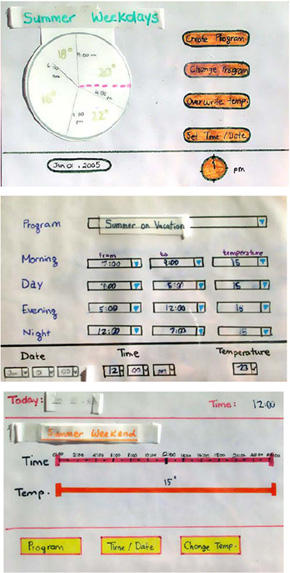
Paper prototypes for three versions of a home thermostat. From [Tohidi CHI2006].
As Carolyn Snyder writes, "Paper prototyping is a variation of usability testing where the representative users perform realistic tasks by interacting with a paper version of the interface that is manipulated by a person 'playing computer' who doesn't explain how the interface is intended to work." In this assignment, your group will construct a paper prototype, test the prototype on someone else, and write up the results.
You should design your paper prototype with specific scenarios and user tasks in mind. For example, your prototype might address how a
child (your user) buys a "snow cone" (the task) from a ice cream truck (scenario/situation) with PayPal mobile.
Working as a group, you will create a paper prototype that illustrates
3 major tasks for your interface / interaction design, perhaps based on your storyboards. The prototype should be complete enough to "run" a new user through each task. Use paper prototyping techniques covered in lecture, the Snyder reading, and optionally http://paperprototyping.com/references.html to guide your process.
Before you come to section, your group must find one appropriate user who is not in your group and run them through the major tasks in the prototype to make sure that you have something that works. Be sure to iteratively refine your prototype until you feel satisfied that it works. You should use participants outside of class.
(Note: each group member should play the part of "Wizard" or "computer" at least once, and all major tasks should be tested.
Each teammate should also observe the other teammates enacting a paper prototyping session.)
Bring your full paper prototype to section and have one person in your group ready to "run" the prototype with the three major tasks. Your prototype will be run by a "user" in this week's studio.
Your group will submit a single write-up which will contain:
Peer evaluation of the group paper prototypes will occur in studio. You'll be getting users of your prototypes and being users of others. When observing others use your interface, you'll record observations and user feedback, which will feed into design improvements.
This assignment will be evaluated on the four dimensions listed below.
After your studio, log into the studio web site, and assess the quality of your assignment. Do so by selecting the cell that best describes your assignment for each of the four dimensions.
The TAs will provide a nuanced grading of your submission performed blind of your own rating, To give you a better idea of what cell your assignment belongs to there are three student examples for you to look at with the TA grading shown.
More information about self-assessment
Grading Dimension |
Guiding questionss |
Bare minimum |
Satisfactory
effort
& performance |
Above & Beyond |
| Completeness (max 25 points) |
Can the prototype be used to run the major interface tasks? Were all the three tasks actually supported? Show us that your user can actually use each part of your application. | 1-13 points; Insufficient completeness of tasks kept the team from generating detailed user feedback. | 14-21 points; All tasks are supported. Prototype includes enough detail and paths of interaction to allow for high-level feedback and minimal detailed feedback. | 22-25 points; Prototype effectively provides intuitive paths to allow detailed and high-level user feedback |
| Interactivity (max 25) |
Can a user actually interact with the interface? (Use of post-its or transparency as appropriate, swapping bits in and out?) Show us a dynamic prototype; we want it to feel like a working application. | 1-13; Post-its and similar elements are only present for some of the interactions | 14-21; Post-its / interactive elements are included but only for major interactions and widgets | 22-25; Interactive elements of the prototype yield a fully 'interactive' experience |
| Clarity (max 20) |
Are the interface details clear? I.e., are the buttons labeled and the text readable? We are looking for a prototype clear enough for your user to interact with it without too much explanation required. | 1-10; Elements are only partially labeled, hard to read, or incomplete | 11-17; Interface elements are well labeled and readable, most user interaction is independent of test conductor clarifications. | 18-20; Interface details are clear and feel realistic given the fidelity, users can interact with your prototype without any guidance from the test conductor |
| Presentation (max 5) |
How is your studio presentation? How do you perform the "Wizard" role? Did your group describe more than one revision that you made to the paper prototype after user testing? Show us that you got practice wizarding your prototype during the user tests and that your group used the feedback to improve your prototype! | 1-2; Wizard role is awkward and obviously unhearsed. Unrealistic interaction flow is hindering useful user feedback. | 3-4; Wizard role is comfortable and sufficient to get user feedback. Revisions were listed. | 5; Well rehearsed Wizard role created a good flow for the prototype; revisions were described |
| Interface (advisory only) |
Does the user interface address your user need? Is the interaction flow effective? Are too many steps required?Did you pick good tasks? | *-**; It's unclear how the interface relates to the user's needs and/or the interaction flow is clumsy and/or the tasks aren't the essential ones or are too similar. | ***-****; The interface mostly addresses the user's goals; the tasks cover most key parts of the user interface; design choices are reasonable. | *****; The interaction flow is very clean, clearly addresses the design goals, and the the tasks effectively demonstrate the different key parts of the user interface. |
| Student examples | Ex I Ex II | Ex III |